Here is a failure that never shows up in a code review. Service A drops a column, or narrows a type. Its own tests pass, the PR merges, the deploy is green. A few minutes later service B, which still reads that column, starts throwing errors in production.
Nobody wrote a bad migration. Service A's migration was correct. The problem is that two services quietly depended on the same table, and nothing in the pipeline knew about it.
If you run several services against a shared (or historically shared) database, you have probably met some version of this. I got tired of meeting it, so I wrote a small tool: migradrift.
Why your tests don't catch it
Every service has its own migrations folder and its own test suite. Each suite asks the same question: does my service work with my schema? That question has a green answer even while another service is about to break.
The contract between the two services is the table itself, and that contract is implicit. It lives in nobody's tests, in no interface file, and in nobody's head after the person who set it up changes teams.
Typical ways it goes wrong:
- A column is dropped in one service while another still selects it.
- A type is narrowed (
texttovarchar(20)) and a long value from the other service no longer fits. - A rename lands in one repo, and the other repo finds out from an alert.
The idea: replay the migrations, then compare
Instead of connecting to a database, migradrift reads the thing every service already has: its SQL migration files.
- You point it at each service's migration folder in a
.migradrift.yamlfile. - It replays the
.sqlfiles of each folder in filename order, the same order your migration tool applies them, and builds a final schema snapshot per service. - For every table that shows up in more than one service, it compares columns and types.
- A column that is missing on one side is reported as an error. A type mismatch is reported as a warning.
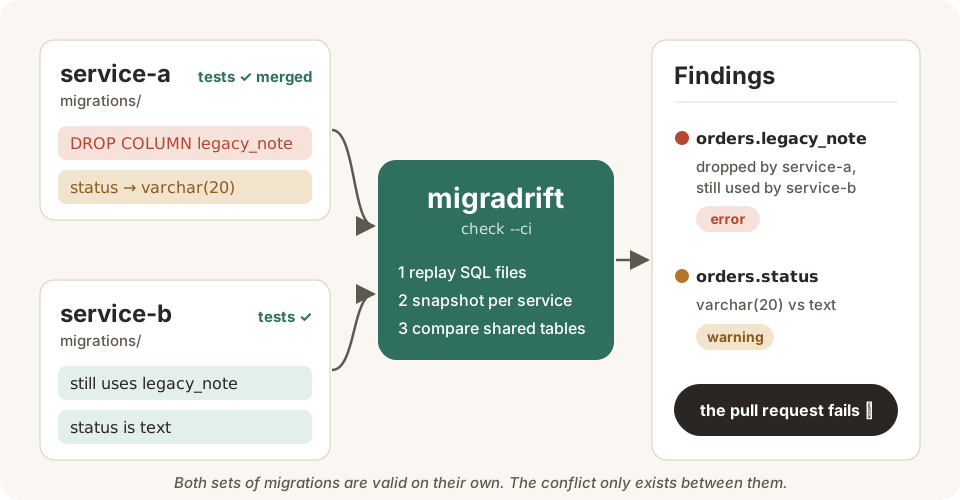
The whole idea in one picture: two valid sets of migrations, one hidden conflict, caught before merge.
Because it only parses files, there is no database to start, no credentials to hand to CI and no network involved. It runs in a second or two and gives the same answer every time.
The config is as small as it sounds:
services:
  - name: service-a
    migrations: ./service-a/migrations
  - name: service-b
    migrations: ./service-b/migrations
migradrift check -c .migradrift.yamlRun against the bundled demo, it reports exactly the two problems described above:
| Finding | Level | Why |
|---|---|---|
orders.legacy_note | error | dropped by service-a, still present in service-b |
orders.status | warning | varchar(20) in service-a vs text in service-b |
Making it fail the pull request
A report nobody reads is just noise, so the point is to put the check where the mistake can still be cheap to fix: in CI, on the PR that introduces the drift.
migradrift check --ci --json > drift-report.json--ci exits non-zero on any error-level finding, so the build goes red before the change ever reaches a shared environment. --json gives you a machine-readable report if you want to post it as a PR comment.
It ships as prebuilt binaries for Linux, macOS and Windows (amd64 and arm64), or you can install it with Go:
go install github.com/suryo12/migradrift/cmd/migradrift@latestWhat it deliberately doesn't do
This is a v0, built to solve one specific, recurring pain. It is not a full SQL engine, and I would rather say that up front than let it surprise you.
- It only understands SQL migration files, so no NoSQL stores.
- It handles
CREATE TABLE,DROP TABLE,ALTER TABLE ADD/DROP COLUMN,RENAME COLUMN, and both the Postgres (ALTER COLUMN ... TYPE) and MySQL (MODIFY COLUMN,CHANGE COLUMN) ways of changing a type. - Indexes and constraints are recognised just enough to be skipped correctly.
- Not handled yet: other dialects (SQLite, SQL Server), multi-column constraints with unusual formatting, and generated or computed columns.
Why build a new tool at all? The alternatives I looked at either wanted me to adopt their entire migration framework or charged per seat. I wanted something small and dependency-light that you can drop into any pipeline in about five minutes, whatever tool you use to apply migrations.
Try it, break it, tell me
The repository has three examples (Postgres, MySQL and a more realistic multi-migration CRUD app), so you can see real output in under a minute. If it misparses your migrations, that is exactly the kind of bug report I want, and contributions are welcome.
If you have run into this problem in some other shape, or you solve it in a completely different way, tell me in the comments below. I am genuinely curious how other teams handle it.
Join the conversation
Questions, corrections or your own experience — all welcome. Comments use GitHub Discussions, so you'll sign in with GitHub.