I run a small always-on assistant at home: an AI coding agent on a mini PC that I talk to through a Telegram bot. I send it a message from my phone, it does the work, and anything that other people will see waits for me to reply with a confirmation code.
In one week it stopped answering three times. Each time I assumed the bot was broken, and each time it wasn't. The code was the same before and after every fix. What changed was something around it: which process owned the connection, what that process inherited, and who decided it was allowed to stop.
These are notes on the three failures, because I think the pattern is more useful than any single fix.
1. One poller per token, and everyone wanted to be it
Telegram lets exactly one client long-poll a bot token at a time. If a second client calls getUpdates, the two fight, and whichever one acknowledges a message first is the one that gets it. Telegram does not deliver it again.
The bot plugin I use knows this, so it does something sensible: on startup it reads a pid file, finds the previous poller and kills it. That protects you from an orphaned process holding the slot forever after a crash.
The trouble was that the plugin was enabled for every agent process on the machine, not only the one I meant to talk to. So whenever any other session started, it quietly took the bot over:
- I opened a second session in another folder to test something. It started its own poller and killed the real one.
- Later I restricted the plugin to the bot's own folder. Then the agent started a background helper in that same folder to do a long task. The helper loaded the plugin, killed the main poller, and became the bot.
The helpers were never configured to listen to the chat, so they took my messages off the queue and dropped them. From my phone it looked exactly like a dead bot. The log line that gave it away was a single, polite sentence: replacing stale poller pid=…. It wasn't stale. It was the bot.
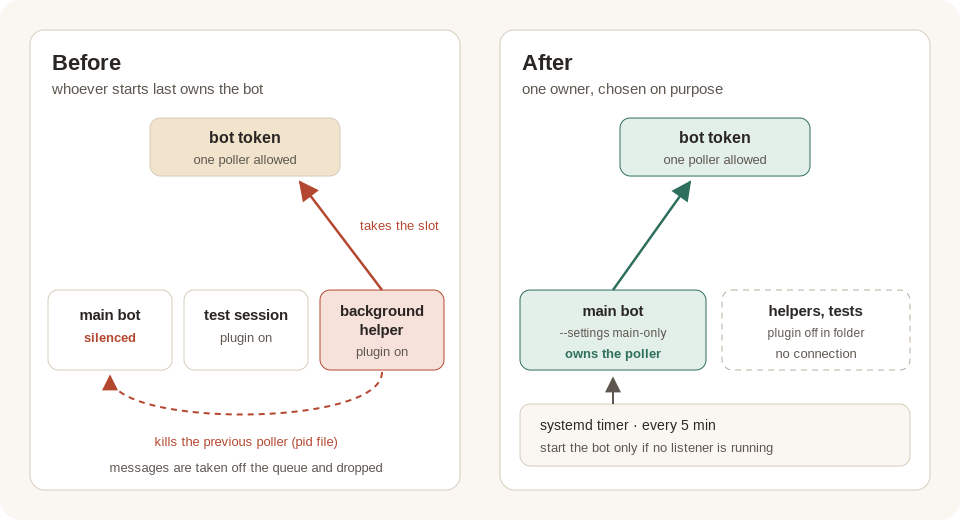
Same bot, same token. The only thing that changed is who is allowed to hold the one connection.
The fix was to stop enabling the listener by location and enable it by process. The folder now has the plugin turned off, and only the main process gets it, through its own settings file passed on the command line. Helpers, test sessions and anything else started in that folder never open a second connection.
The lesson I took: a resource that allows exactly one consumer needs exactly one owner, chosen on purpose. "Whoever starts last" is not an owner.
2. A 401 that wasn't about the token
The second time, the bot did answer, but told me its access token for an internal API had expired and asked me to generate a new one.
It hadn't expired. Another session on the same machine was using the same token without any trouble. The difference was how the bot had been started. I had moved it under a systemd user service so it would come back after a reboot, and systemd does not read ~/.bashrc, which is where the token lived. The process simply had no token, sent an empty one, and got a 401.
A quick look at the running process settles this kind of question:
tr '\0' '\n' < /proc/<pid>/environ | grep -q '^API_TOKEN=.' && echo present || echo missingThe fix was an EnvironmentFile= in the unit. The lesson is about the diagnosis, not the fix: before you blame a credential, check that the process that failed actually has it. A rotated token and a missing one look identical from the error message.
3. Idle, by someone else's definition
The third failure happened overnight. I had moved the bot into the agent's "background session" mode, which runs sessions without a terminal attached. It worked well for a day.
In the morning it was gone. The daemon's log had one line about it:
bg retire 2a4e9721: settled, idle 61m
Background sessions are retired after an hour with nothing happening. For a coding task that's a reasonable cleanup rule. For a listener whose whole job is to wait, an hour of quiet is the normal state.
The annoying part is why it had survived before: an earlier version of the setup ran a log-watching loop inside the session, and that loop kept it looking busy. I had removed that loop the day before to cut cost. I made the system cheaper and, without knowing it, took away the only thing keeping it alive.
The bot now runs as an ordinary interactive session inside tmux, which nothing retires. A systemd timer runs a small script every five minutes that starts the bot only if no listener is running in its folder. If it dies for any reason, it is back within five minutes, and the script never starts a second copy, which would bring back problem number one.
The common thread
None of these were bugs in the bot. They were all questions about the process around it:
- Who owns the single connection? If you can't name the process, assume something else will claim it.
- What did it inherit? Environment, permissions and settings depend on how a process was started, not on what's in your shell.
- Who decides it's done? Supervisors, daemons and cleanup jobs each have their own idea of "idle". A listener needs to be exempt from all of them, or watched by something that restarts it.
The habit I'm keeping is boring and quick. After any change to how the bot runs, I check three things: which pid holds the poller, whether that process has the environment it needs, and what will restart it if it stops. It takes a minute, and it would have saved me three confused mornings.
Join the conversation
Questions, corrections or your own experience — all welcome. Comments use GitHub Discussions, so you'll sign in with GitHub.